Appearance
Get Started
In this page, you will get started with Personal Features, and how to setup your first feature in Investec Online.
After completing this page, you should be able to:
- Create a new feature application
- Install the SDK via node
- Running the feature in Investec Online
- Connecting to your data via the SDK
INFO
For the purpose of this documentation we will be referring to our SDK as the giga-sdk and not invsy-sdk. Both do exactly the same thing, they just have different namespaces. You can still you use the invsy-sdk documentation as reference for giga-sdk
This page will explain each step:
1. Create a new feature application
TIP
You need to complete this step in your own IDE of choosing (vs-code, intellij etc.) You need to spin up your application on your local machine and use that url in Investec Online website
Create a new web application of your choosing. The following links will explain how to create a new application in different frameworks
Angular
ng new my-first-project
cd my-first-project
ng serve
ng new my-first-project
cd my-first-project
ng serveReact
npx create-react-app my-app
cd my-app
npm start
npx create-react-app my-app
cd my-app
npm startVue
vue create hello-worldvue create hello-worldPersonal Features are not limited to the above-mentioned frameworks and libraries. Any web application can be used as a personal feature and run in Investec Online and the mobile app.
2. Install the SDK via npm
The SDK is the only communication mechanism between Investec and your personal feature. The SDK is a node package that is added to your feature.
Run the following command in your feature's terminal:
npm i gigachat --savenpm i gigachat --saveThis node package is used in your feature and contains various capabilities and API's. Access the documentation inside Investec Online
3. Running the feature in Investec Online
INFO
This step requires that you have a loggedIn session in Investec Online website.
Add the following line of code in your main startup file.
ts
import { giga } from 'gigachat';

giga.platform.init().then(() => giga.platform.initSession())
import { giga } from 'gigachat';
giga.platform.init().then(() => giga.platform.initSession())TIP
Every web framework has a different way of initialising an app. The above-mentioned code needs to run first when your app is loading.
This will check if your app is running inside the Investec Platform and if not it will redirect to Investec Online website in dev-mode. Enter your local URL in the dev-mode address bar.
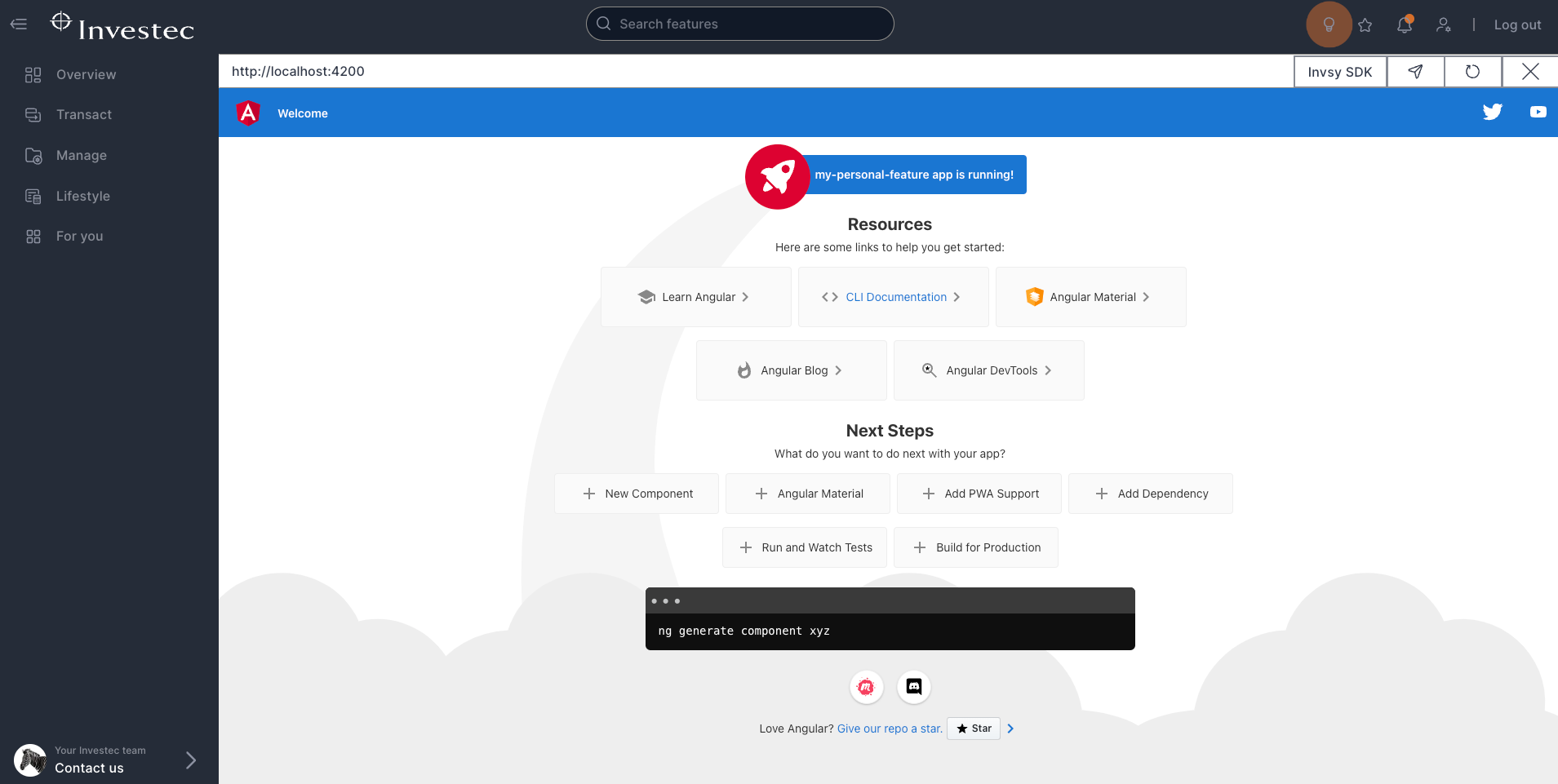
Alternatively
You can open Dev Mode by appending /dev-mode in the URL bar in Investec Online and reloading the page. 
Once the Dev Mode URL bar is visible, you can load your feature by entering the local URL of your feature and hit "Enter" on your keyboard or clicking the load feature icon

4. Connecting to your data via the SDK
Data is requested from your feature and passed on to the Investec platform via the SDK. The platform then gets the information and returns it via the SDK.
The following code will get your contact details from Investec and return it to your feature.
ts
giga.data.getClientBasicDetails().then((res:any) => {
    console.log(res.result)
})giga.data.getClientBasicDetails().then((res:any) => {
console.log(res.result)
})The following code will get all your accounts and transactions for the first account between two dates.
ts
async function getTransactionData() {
    try {
      const accountList = await giga.api.privateClient.pbsa.accounts.list();
      const transactions = await giga.api.privateClient.pbsa.transactions.get({
        accountId: accountList.result.PrivateBankAccounts[0].AccountNumberForRequests,
        dateFrom: '09/10/2022',
        dateTo: '08/11/2022'
      });
      return transactions.result;
    } catch (error) {
      console.error(error);
    }
  }
async function getTransactionData() {
try {
const accountList = await giga.api.privateClient.pbsa.accounts.list();
const transactions = await giga.api.privateClient.pbsa.transactions.get({
accountId: accountList.result.PrivateBankAccounts[0].AccountNumberForRequests,
dateFrom: '09/10/2022',
dateTo: '08/11/2022'
});
return transactions.result;
} catch (error) {
console.error(error);
}
}For a full list of all the capabilities and API's in the SDK, you can open the live documentation inside Investec Online in Dev Mode:
